Title Manager

Desktop Application (Visual Basic), used in the Local server, to manage the databases: title, issue and section, it means, respectively the data of journals, their issues and sections of the table of contents.

Prevent installation errors

Read:

How to update

Warning

If Title Manager does not open properly, reinstall the programs.

Opening the program

Use the Windows menu to open the program.
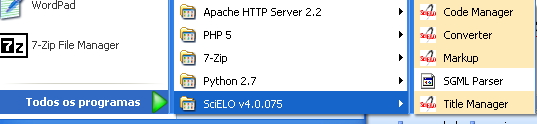
_images/scielo_menu.png
  • Journals
    • Creating a new record
    • Opening a record to edit the journal data
    • Deleting records of journals and their issues
  • Journal form
    • Journal form: Titles
    • Journal Form: Subject areas
    • Journal form: formal information
    • Journal form: publishers and sponsors
    • Journal form: license or copyright
    • Journal form: history of journal’s status in the collection
    • Journal form: website
    • Journal form: other information
  • Sections
    • Opening the journal sections form
    • Sections form
    • Creating a section
    • Editing the section
    • Deleting a section
  • Issues
    • How to open the program
    • How to identify an issue
    • Problems with filling in the sequential number
    • How to list the issues
    • Creating/editing an issue
    • General data
    • Bibliographic strip
    • Table of contents
    • Creative Commons License
    • Deleting issue
  • Issue database
  • Section database

SciELO PC Programs

Navigation

Related Topics

  • Documentation overview

Quick search

©2020, SciELO. | Powered by Sphinx 1.8.6 & Alabaster 0.7.12 | Page source